mirror of
https://github.com/FranP-code/ChatGPT.git
synced 2025-10-13 00:13:25 +00:00

165 lines
7.2 KiB
Markdown
165 lines
7.2 KiB
Markdown
<p align="center">
|
|
<img width="180" src="./public/logo.png" alt="ChatGPT">
|
|
<h1 align="center">ChatGPT</h1>
|
|
</p>
|
|
|
|
> ChatGPT Desktop Application
|
|
|
|
[](./README.md)
|
|
[](./README-ZH_CN.md)
|
|
|
|
[](https://github.com/lencx/ChatGPT/releases)
|
|
[](https://discord.gg/aPhCRf4zZr)
|
|
[](https://twitter.com/lencx_)
|
|
<!-- [](./README-ZH.md) -->
|
|
|
|
[Awesome ChatGPT](./AWESOME.md)
|
|
|
|
## 📦 Downloads
|
|
|
|
[📝 Update Log](./UPDATE_LOG.md)
|
|
|
|
<!-- download start -->
|
|
|
|
**Latest:**
|
|
|
|
- `Mac`: [ChatGPT_0.3.0_x64.dmg](https://github.com/lencx/ChatGPT/releases/download/v0.3.0/ChatGPT_0.3.0_x64.dmg)
|
|
- `Linux`: [chat-gpt_0.3.0_amd64.deb](https://github.com/lencx/ChatGPT/releases/download/v0.3.0/chat-gpt_0.3.0_amd64.deb)
|
|
- `Windows`: [ChatGPT_0.3.0_x64_en-US.msi](https://github.com/lencx/ChatGPT/releases/download/v0.3.0/ChatGPT_0.3.0_x64_en-US.msi)
|
|
|
|
[Other version...](https://github.com/lencx/ChatGPT/releases)
|
|
|
|
<!-- download end -->
|
|
|
|
### Install
|
|
|
|
Easily install with _[Homebrew](https://brew.sh) ([Cask](https://docs.brew.sh/Cask-Cookbook)):_
|
|
|
|
~~~ sh
|
|
brew tap lencx/chatgpt https://github.com/lencx/ChatGPT.git
|
|
brew install --cask chatgpt --no-quarantine
|
|
~~~
|
|
|
|
Also, if you keep a _[Brewfile](https://github.com/Homebrew/homebrew-bundle#usage)_, you can add something like this:
|
|
|
|
~~~ rb
|
|
repo = "lencx/chatgpt"
|
|
tap repo, "https://github.com/#{repo}.git"
|
|
cask "popcorn-time", args: { "no-quarantine": true }
|
|
~~~
|
|
|
|
## ✨ Features
|
|
|
|
- Multi-platform: `macOS` `Linux` `Windows`
|
|
- Export ChatGPT history (PNG, PDF and Share Link)
|
|
- Automatic application upgrade notification
|
|
- Common shortcut keys
|
|
- System tray hover window
|
|
- Powerful menu items
|
|
|
|
### MenuItem
|
|
|
|
- **Preferences**
|
|
- `Theme` - `Light`, `Dark` (Only macOS and Windows are supported).
|
|
- `Stay On Top`: The window is stay on top of other windows.
|
|
- `Titlebar`: Whether to display the titlebar, supported by macOS only.
|
|
- `Hide Dock Icon` ([#35](https://github.com/lencx/ChatGPT/issues/35)): Hide application icons from the Dock(support macOS only).
|
|
- Right-click on the system tray icon to show or hide the application icons in the Dock
|
|
- `Inject Script`: Using scripts to modify pages.
|
|
- `Control Center`: The control center of ChatGPT application, it will give unlimited imagination to the application.
|
|
- `Theme`, `Stay On Top`, `Titlebar`, ...
|
|
- `User Agent` ([#17](https://github.com/lencx/ChatGPT/issues/17)): Custom `user agent`, which may be required in some scenarios. The default value is the empty string.
|
|
- `Switch Origin` ([#14](https://github.com/lencx/ChatGPT/issues/14)): Switch the site source address, the default is `https://chat.openai.com`, please make sure the mirror site UI is the same as the original address. Otherwise, some functions may not be available.
|
|
- `Go to Config`: Open the configuration file directory (`path: ~/.chatgpt/*`).
|
|
- `Clear Config`: Clear the configuration file (`path: ~/.chatgpt/*`), dangerous operation, please backup the data in advance.
|
|
- `Restart ChatGPT`: Restart the application, for example: the program is stuck or the injection script can take effect by restarting the application after editing.
|
|
- `Awesome ChatGPT`: Recommended Related Resources.
|
|
- **Edit** - `Undo`, `Redo`, `Cut`, `Copy`, `SelectAll`, ...
|
|
- **View** - `Go Back`, `Go Forward`, `Scroll to Top of Screen`, `Scroll to Bottom of Screen`, `Refresh the Screen`, ...
|
|
- **Help**
|
|
- `Update Log`: ChatGPT changelog.
|
|
- `Report Bug`: Report a bug or give feedback.
|
|
- `Toggle Developer Tools`: Developer debugging tools.
|
|
|
|
## TODO
|
|
|
|
- Web access capability ([#20](https://github.com/lencx/ChatGPT/issues/20))
|
|
- Shortcut command typing chatgpt prompt
|
|
- ...
|
|
|
|
## 👀 Preview
|
|
|
|
<img width="320" src="./assets/install.png" alt="install"> <img width="320" src="./assets/control-center.png" alt="control center">
|
|
<img width="320" src="./assets/export.png" alt="export"> <img width="320" src="./assets/tray.png" alt="tray">
|
|
<img width="320" src="./assets/tray-login.png" alt="tray login"> <img width="320" src="./assets/auto-update.png" alt="auto update">
|
|
|
|
---
|
|
|
|
<a href="https://www.buymeacoffee.com/lencx" target="_blank"><img src="https://cdn.buymeacoffee.com/buttons/v2/default-blue.png" alt="Buy Me A Coffee" style="height: 60px !important;width: 217px !important;" ></a>
|
|
|
|
## ❓FAQ
|
|
|
|
### Can't open ChatGPT
|
|
|
|
If you cannot open the application after the upgrade, please try to clear the configuration file, which is in the `~/.chatgpt/*` directory.
|
|
|
|
### Out of sync login status between multiple windows
|
|
|
|
If you have already logged in in the main window, but the system tray window shows that you are not logged in, you can fix it by restarting the application (`Menu -> Preferences -> Restart ChatGPT`).
|
|
|
|
### Is it safe?
|
|
|
|
It's safe, just a wrapper for [OpenAI ChatGPT](https://chat.openai.com) website, no other data transfer exists (you can check the source code).
|
|
|
|
### Developer cannot be verified?
|
|
|
|
- [Open a Mac app from an unidentified developer](https://support.apple.com/en-sg/guide/mac-help/mh40616/mac)
|
|
|
|
### How do i build it?
|
|
|
|
#### PreInstall
|
|
|
|
- [Rust](https://www.rust-lang.org/)
|
|
- [VS Code](https://code.visualstudio.com/)
|
|
- [rust-analyzer](https://marketplace.visualstudio.com/items?itemName=rust-lang.rust-analyzer)
|
|
- [tauri](https://marketplace.visualstudio.com/items?itemName=tauri-apps.tauri-vscode)
|
|
|
|
#### Start
|
|
|
|
```bash
|
|
# step1:
|
|
git clone https://github.com/lencx/ChatGPT.git
|
|
|
|
# step2:
|
|
cd ChatGPT
|
|
|
|
# step3: install deps
|
|
yarn
|
|
|
|
# step4:
|
|
yarn dev
|
|
|
|
# step5:
|
|
# bundle path: src-tauri/target/release/bundle
|
|
yarn build
|
|
```
|
|
|
|
## ❤️ Thanks
|
|
|
|
- The core implementation of the share button code was copied from the [@liady](https://github.com/liady) extension with some modifications.
|
|
<!-- - [Awesome ChatGPT Prompts](https://github.com/f/awesome-chatgpt-prompts) -->
|
|
|
|
---
|
|
|
|
[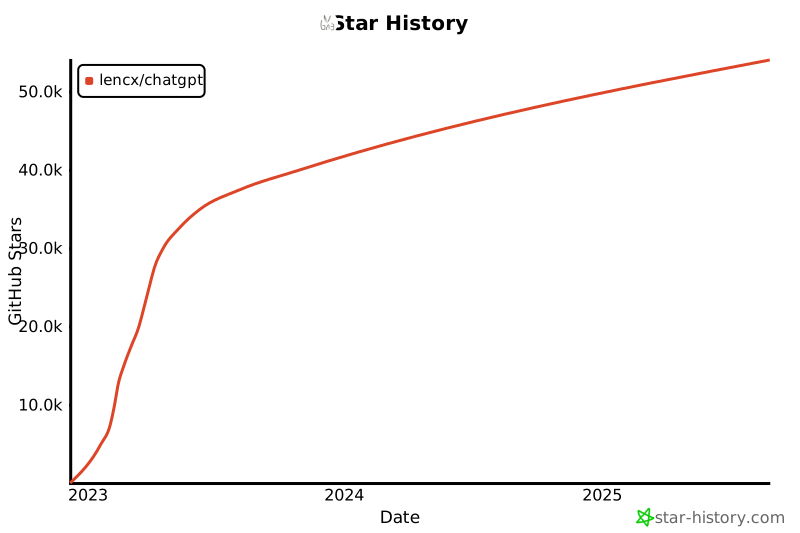](https://star-history.com/#lencx/chatgpt&Date)
|
|
|
|
## 中国用户
|
|
|
|
国内用户如果遇到使用问题或者想交流 ChatGPT 技巧,可以关注公众号“浮之静”,发送 “chat” 进群参与讨论。公众号会更新[《Tauri 系列》](https://mp.weixin.qq.com/mp/appmsgalbum?__biz=MzIzNjE2NTI3NQ==&action=getalbum&album_id=2593843659863752704)文章,技术思考等等,如果对 tauri 开发应用感兴趣可以关注公众号后回复 “tauri” 进技术开发群(想私聊的也可以关注公众号,来添加微信)。开源不易,如果这个项目对你有帮助可以分享给更多人,或者微信扫码打赏。
|
|
|
|
<img width="180" src="https://user-images.githubusercontent.com/16164244/207228300-ea5c4688-c916-4c55-a8c3-7f862888f351.png"> <img width="200" src="https://user-images.githubusercontent.com/16164244/207228025-117b5f77-c5d2-48c2-a070-774b7a1596f2.png">
|
|
|
|
## License
|
|
|
|
Apache License
|